







Designed by a field operator
Born on the jobsite. Used in every home you build.
TPTM was designed by a field operator and owner with decades of experience, around the day your Construction Managers actually have: walk the home, see what it needs, get it to the right trade, and move on to the next lot. Here’s what that looks like, screen by screen.
Start of the day
One screen that says what needs doing today.
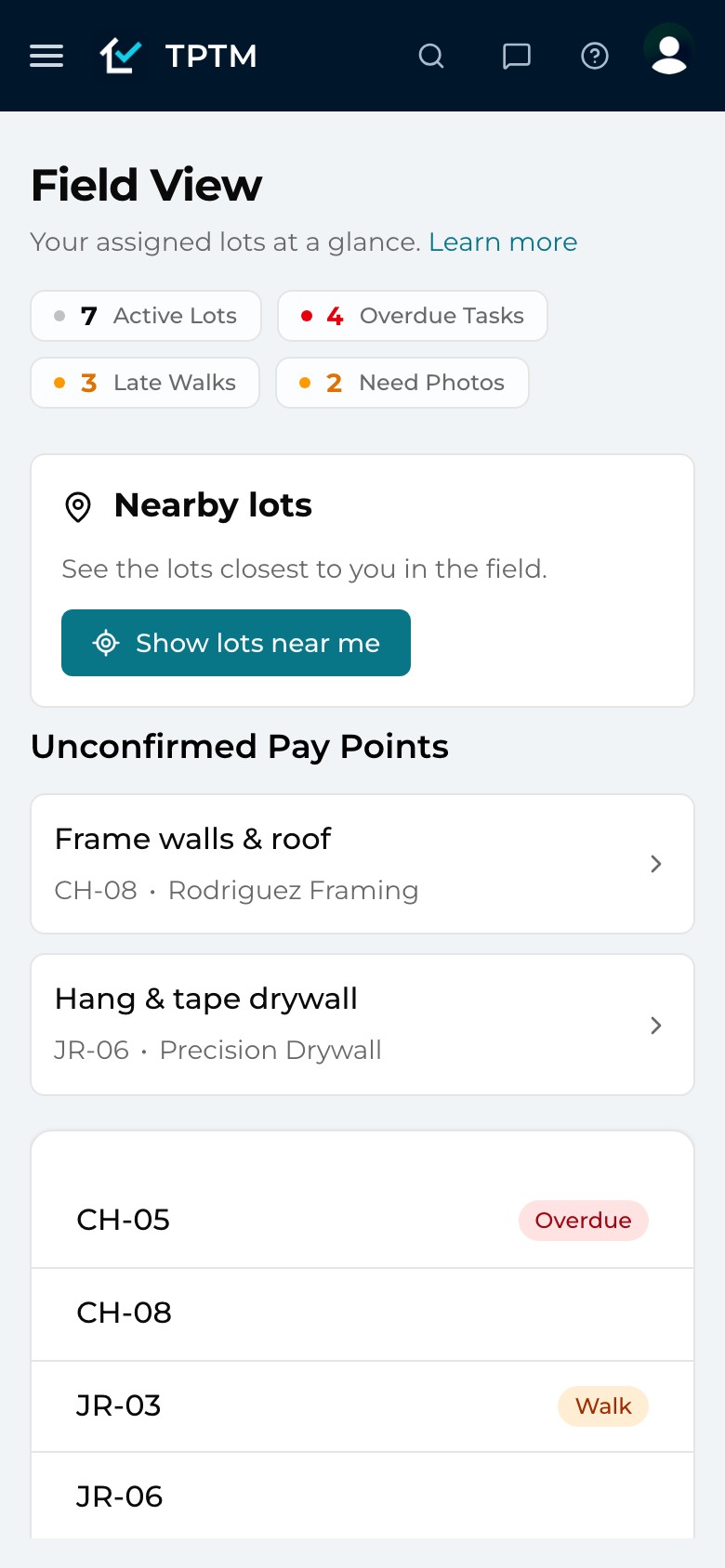
Most software makes a Construction Manager go looking for the work. Field View brings it to them. It’s the home screen for the lots they manage, and it answers one question while they’re standing in a driveway: what needs me today?
Four running totals sit at the top — active lots, overdue tasks, late walks and lots that need photos. Lots on hold are left out, so the numbers describe work that can actually move. Below them, every assigned lot carries flags for exactly what it’s missing.
- Flags, not reports. Walk, Photo, Overdue and Hold badges sit on each lot, so the day’s route plans itself.
- Nearby lots. One tap lists the lots within 1,000 feet of where you’re standing, closest first — including a neighbour’s lot that needs a look while you’re on the street.
- Pay points waiting on you. Completed work that still needs a Construction Manager’s OK is listed right there, ready to mark ready to pay.
GPS-verified walks
A walk you can prove, without an extra tap.
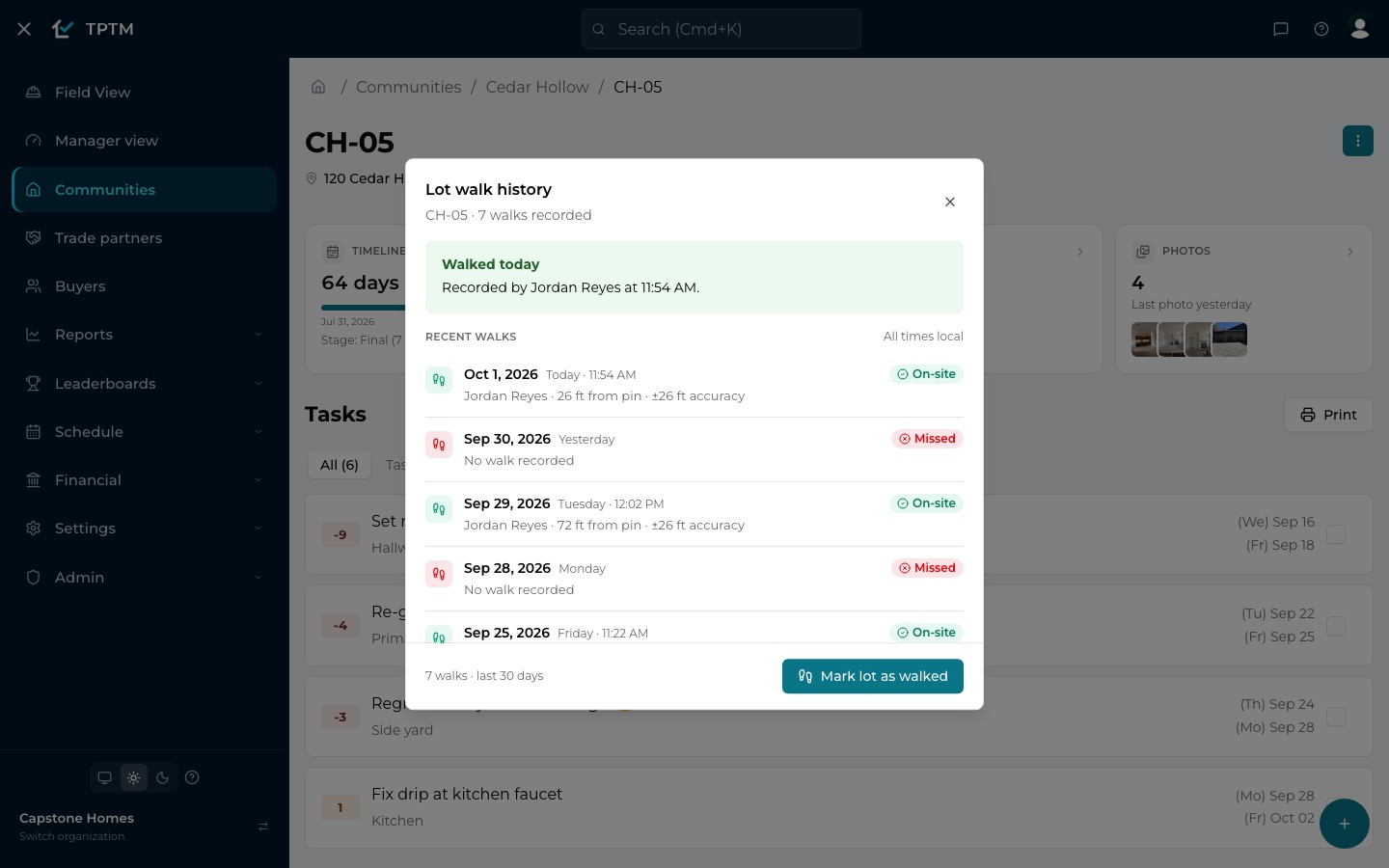
Every builder says the lots get walked. Few can show it. In TPTM, when a Construction Manager opens a lot they manage, the walk records itself — once a day, with the distance from the lot’s pin and how precise the reading was.
The check is deliberately honest. Within 100 feet of the pin, the walk is logged on site. Too far away, nothing is recorded automatically. If the location can’t be read, the app says so instead of guessing. And when someone confirms a lot another way, “Walk anyway” logs it — plainly marked as off site.
- A history anyone can read. Each lot keeps its walks: who, when, how far from the pin, on site or off site — and the days nobody came are marked missed.
- Trust that travels. A list verified on site this morning is one a trade can trust enough to send a crew.
Punch lists
Write it once on site. The right trade sees it.
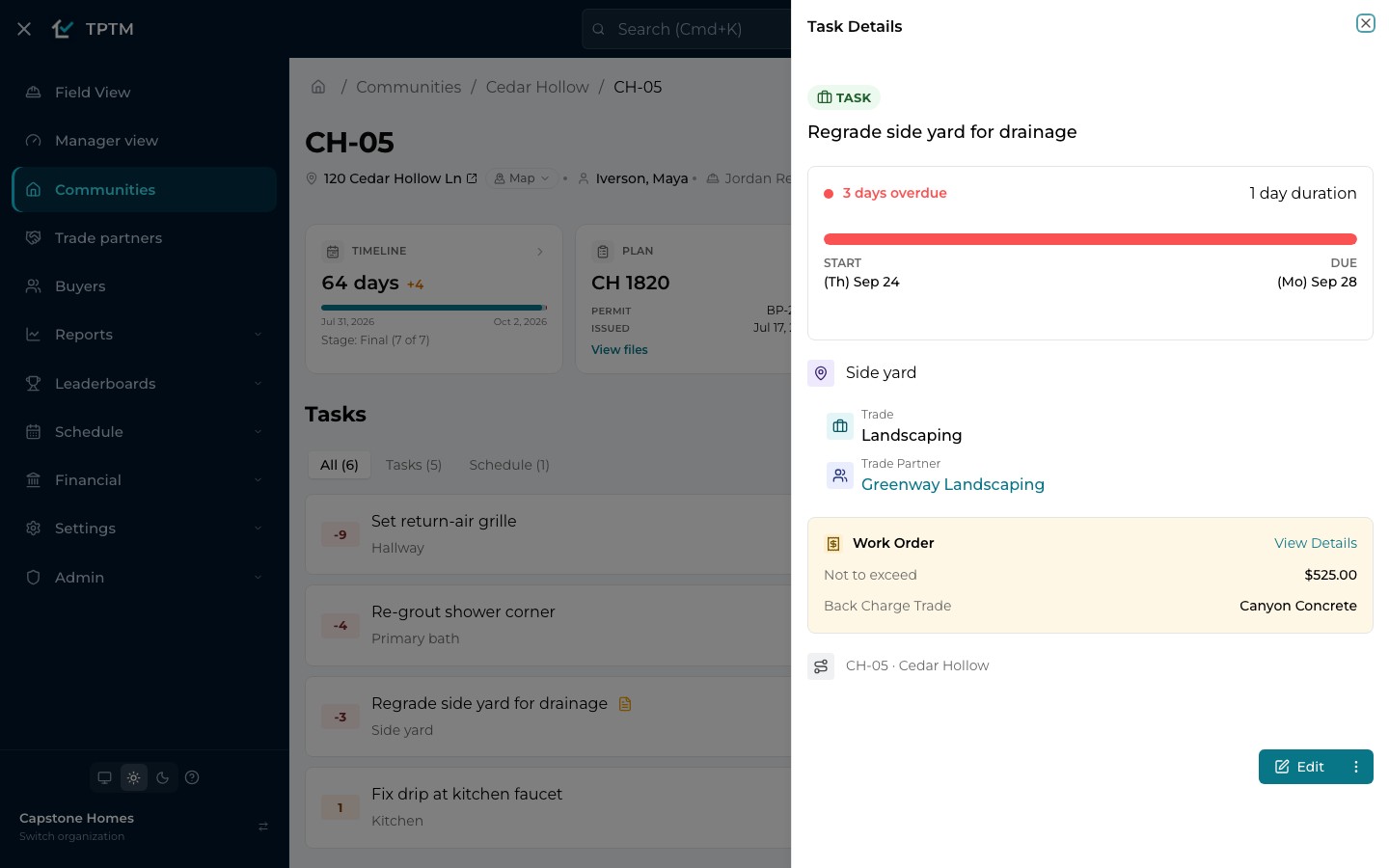
A punch item in TPTM isn’t a line in a notebook that has to be retyped at the office. It’s a task on the lot, with where it is, which trade owns it, which trade partner is doing it and when it’s due — written by the person standing in front of the problem.
The trade partner sees it in their own portal, from a link, with no login and nothing to install. If the fix belongs on another trade’s bill, the task can carry a work order and a back charge, so the cost lands where it belongs instead of in someone’s memory.
- Overdue shows itself. Every task counts its days against the due date, so late work is red before anyone has to ask.
- Photos on the task. Attach what you saw, so the crew arrives knowing exactly what to fix.
Progress photos
Photos that tell the whole story of a home.
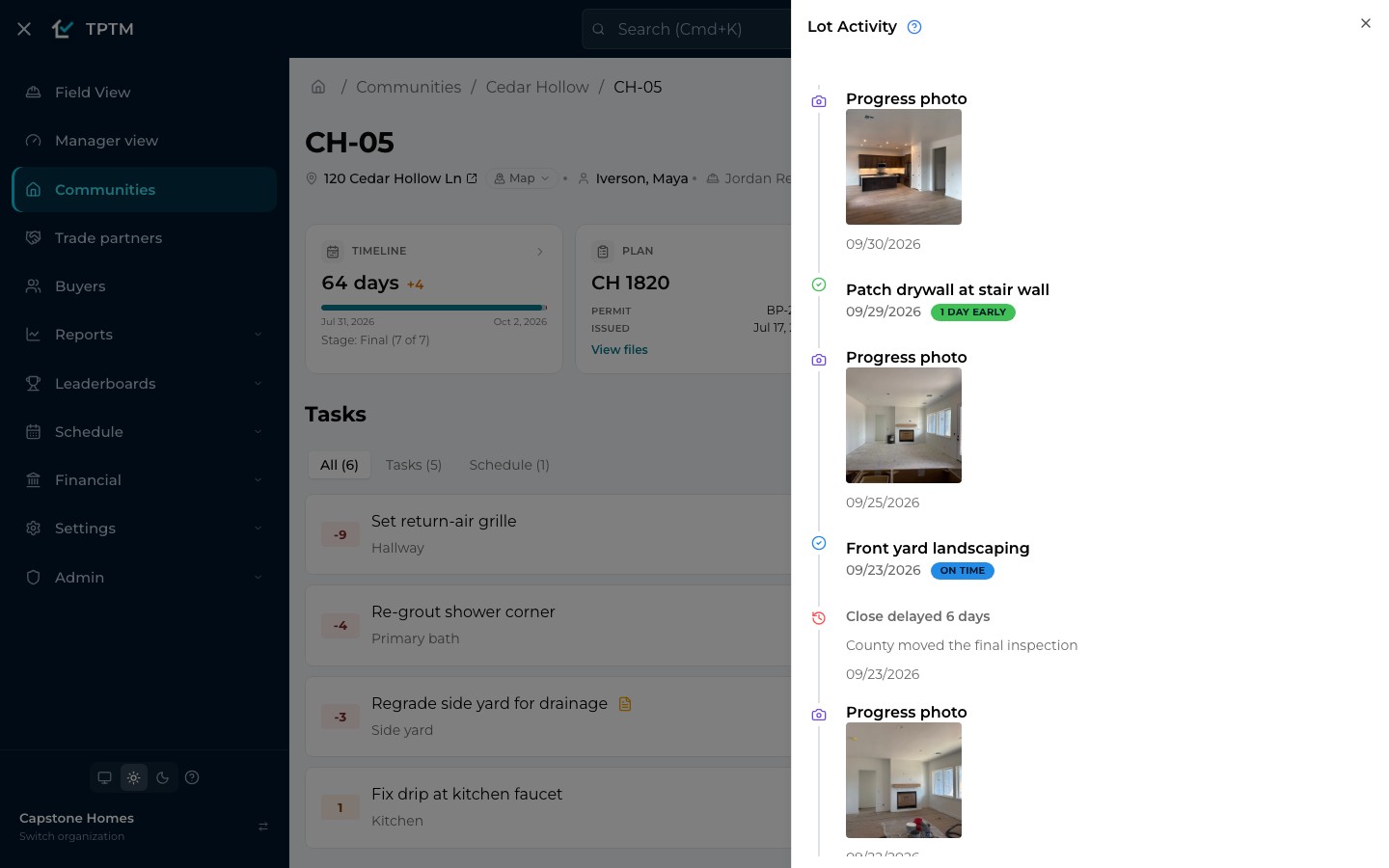
Photos are how everyone who isn’t standing on the lot sees it. In TPTM they live on the lot, not in a camera roll: add one from the lot page, and it lands in the lot’s gallery and on its activity timeline beside the stages and completed tasks.
When the home has a buyer who can receive texts, a new progress photo is texted to them automatically — and “Send now” catches up anything they haven’t had yet. A lot with no photo in the last seven days gets a Photo flag, so the gallery never quietly goes stale.
- One timeline per home. Progress photos, stages and completed tasks — each marked on time, early or late — in the order they happened.
- Buyers kept in the loop. Without a single extra phone call from the Construction Manager.
Accountability, built in
See the process is followed — and fix it where it isn’t.
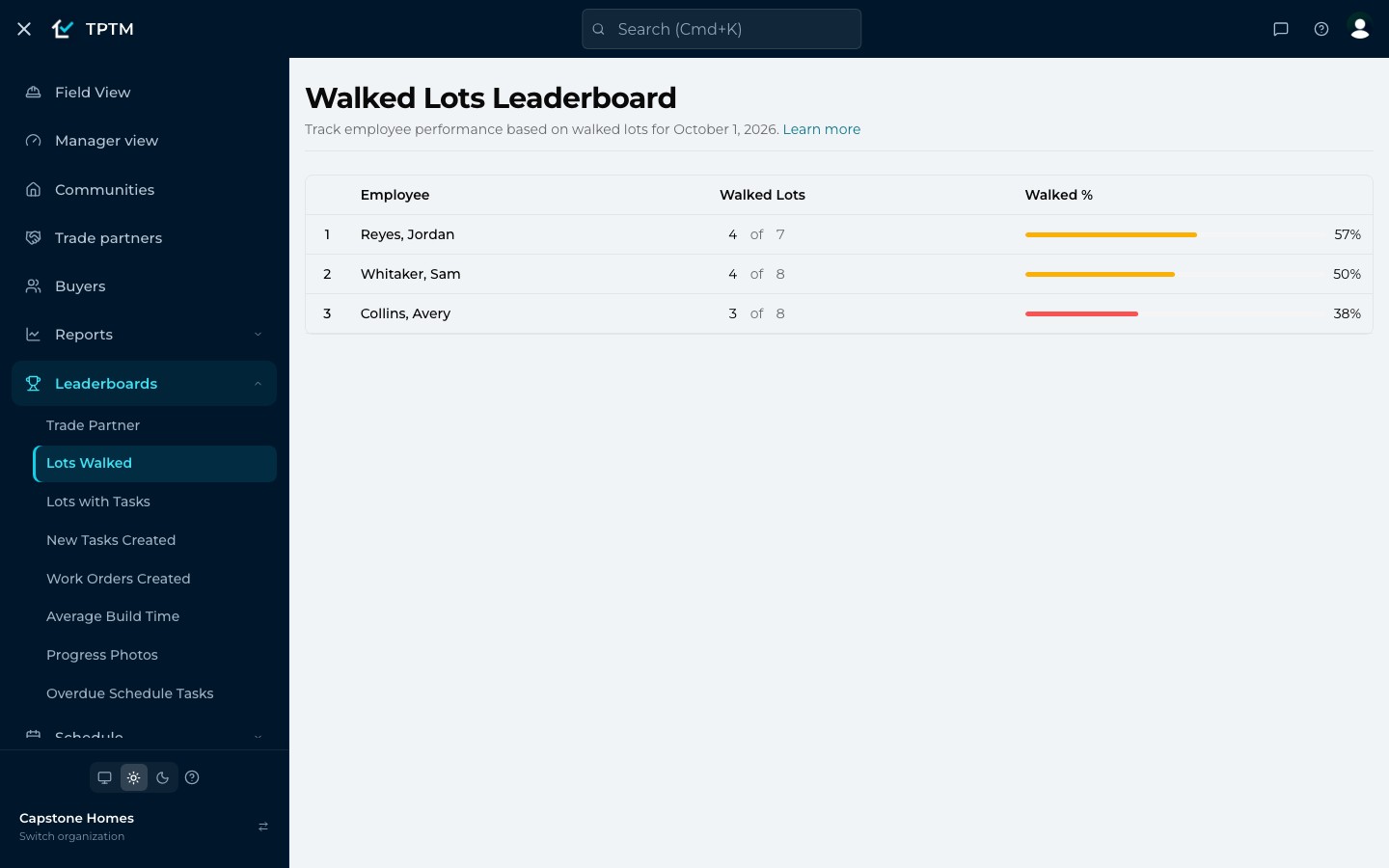
Because walks, photos and completions are recorded where they happen, leadership doesn’t have to take anyone’s word for it. The Walked Lots and Progress Photos leaderboards show, for any day, how many of each Construction Manager’s active lots were walked and how many have current photos.
Holds keep that picture fair. Put a lot on hold with a reason — “Waiting on truss delivery” — and it shows on the lot and drops out of the day’s totals, so nobody is chased for work that can’t move.
- Coaching, not guessing. A low number points at the lots to look at together, not at a hunch.
- Every change on the record. Walks, completions, photos and back charges are time-stamped, so the history of a home is always there.
The field app
Works where the signal doesn’t.
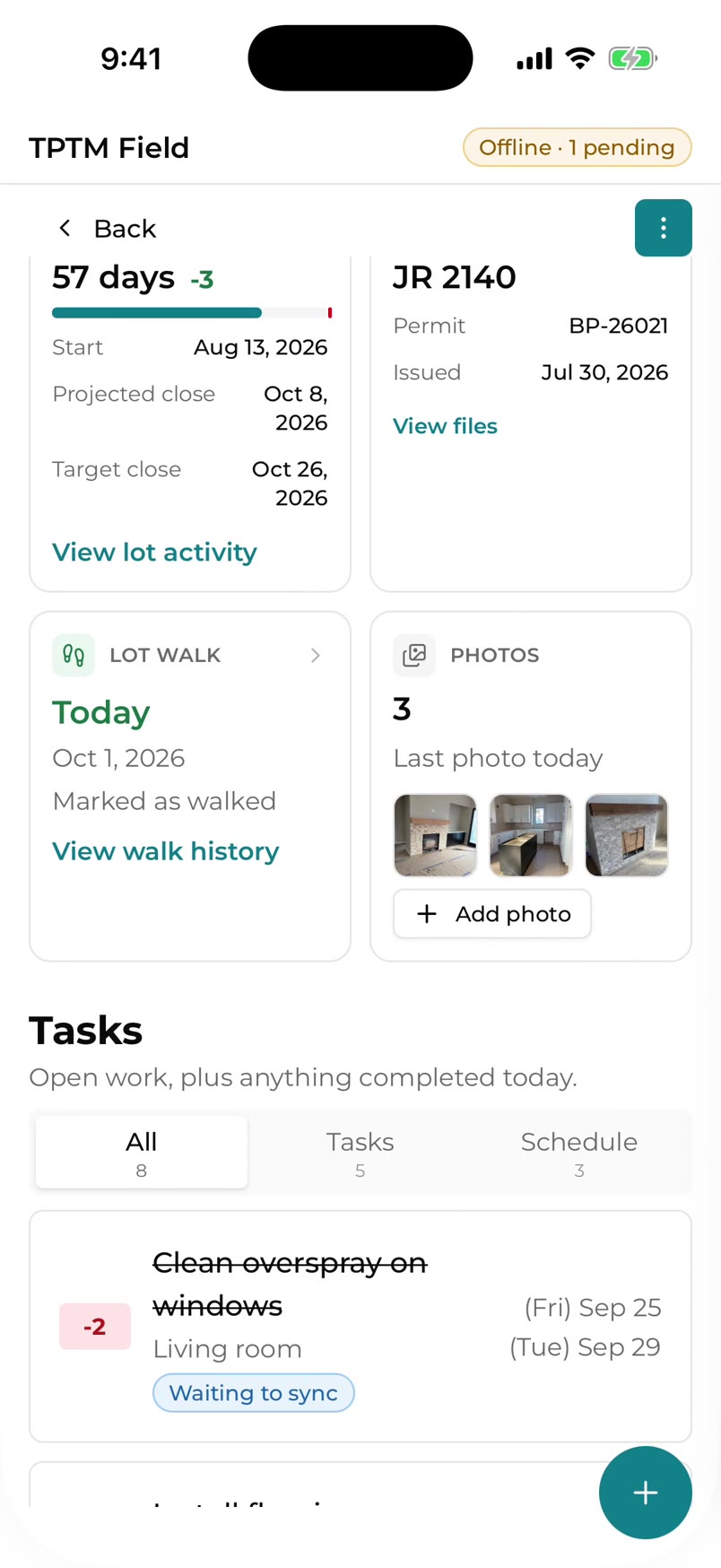
Half-framed houses, basements and the back of a subdivision the carrier map swears is covered. TPTM Field, the native app for iPhone, iPad and Android, is built for exactly those places.
Everything a Construction Manager needs is downloaded to the device, so screens open with no connection at all. Tick a task complete, record a walk, add a photo or confirm a pay point, and it saves on the phone at once, then sends itself — in order — the next time there’s a signal. A small sync chip always shows whether your work has gone.
- Nothing to press. No sync button and nothing to remember: a change survives a flat battery or a restart until it’s sent.
- Honest about what goes out. Changes that reach someone else — a buyer text, a trade email — are spelled out before you tap, and listed afterwards.
- Trades still need nothing. The app is for your team. Trade partners keep working from their link in any phone browser.
Questions
What builders ask about this.
How does TPTM know a lot was really walked?
When the assigned Construction Manager opens the lot, TPTM checks the device’s location against the lot’s pin. Within 100 feet, the walk is recorded as on site with the measured distance. Further away, nothing is recorded automatically; the Construction Manager can still use “Walk anyway”, which is logged as off site so the record stays honest.
Is location tracked all day?
No. Location is read when a walk is recorded and, if you choose, when you ask for the lots near you. Finding nearby lots happens on the device and isn’t sent to TPTM; a recorded walk carries its coordinates so it can be verified.
Do trade partners need the field app?
No. Trade partners get a link by text or email that opens their own portal in any phone browser — no login, no password, nothing to install. The field app is for your Construction Managers.
What happens to work done with no signal?
In the field app, each change is saved on the phone immediately and sent automatically, in order, when a connection comes back. If TPTM refuses a change — say the task was already completed by someone else — the app tells you why instead of dropping it.
Can buyers see progress photos?
Yes. When a lot’s buyer can receive texts, a progress photo added to the lot is texted to them, and “Send now” sends any photos they haven’t received yet.
Get started
Give the field a program it will actually use.
Tell us about your company and we'll show you TPTM running on homes like yours.
- Tell us about your homesTwo minutes, right here.
- See it on your communitiesA walkthrough built around how your Construction Managers and trades already work.
- Send your trades a linkNo onboarding, no sign-in. They're in.
Get started with TPTM
We'll get back to you personally.