








Trade partner performance report
Your trades see their numbers. So they fix them — fast.
Every trade partner gets a live scorecard from you: their on-time rate, how their finishes spread from late to early, and where the slips are — by community and by type of work. It’s the same scoring your team reviews, so the conversation starts from facts instead of memory.
Spot it
Know which trade is slipping before the quarter does.
Late trades rarely announce themselves. A day here, two days there, spread across three communities and four Construction Managers — by the time anyone adds it up, the close dates have already moved.
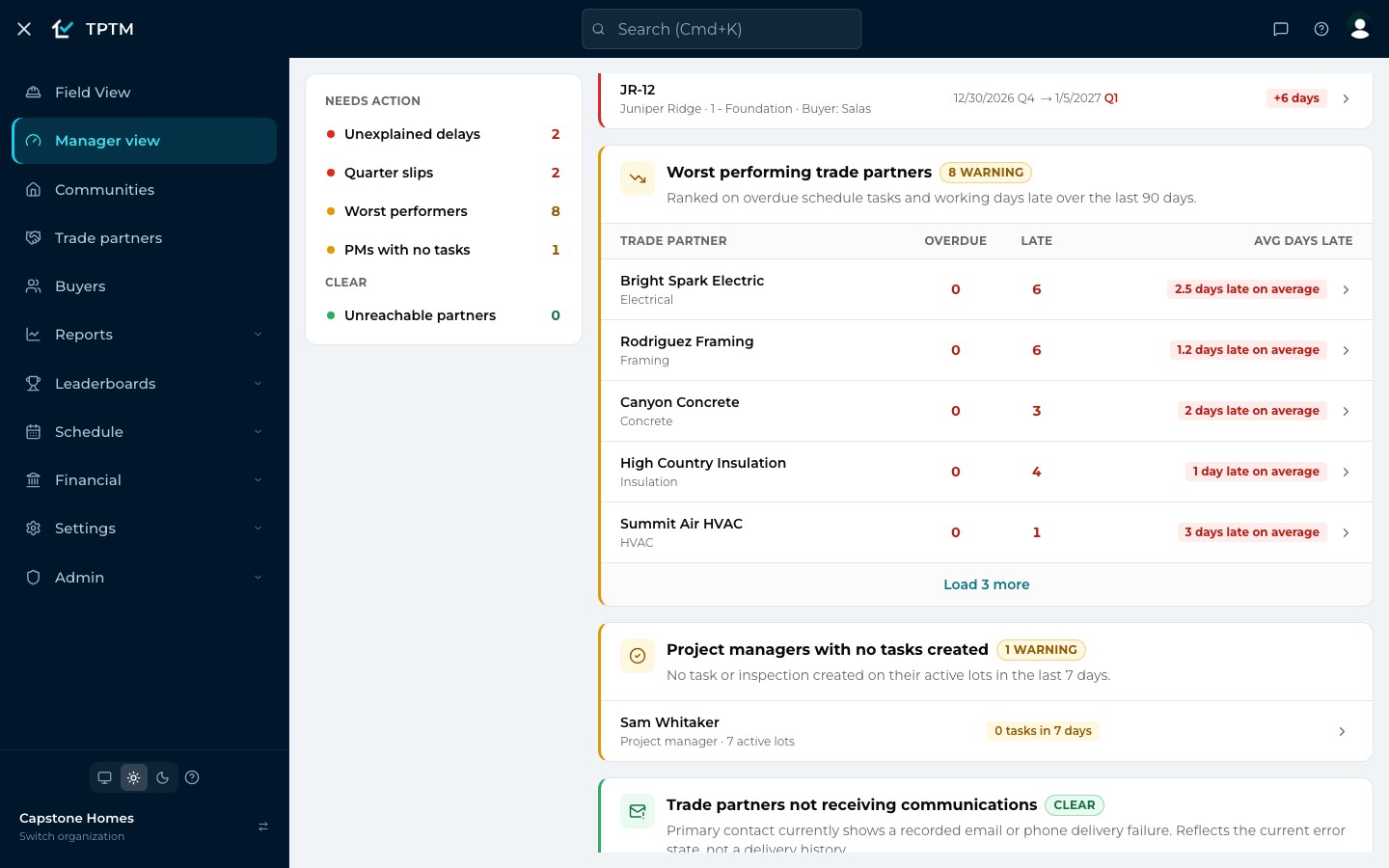
TPTM adds it up for you. Manager view ranks your trade partners over the last 90 days on the schedule work they have overdue right now, how many schedule tasks they finished late, and how many working days late those were on average. One click on a name opens that partner’s full report.
- Counted in working days. Weekends and your own holiday calendar are skipped, so a Friday task finished Monday is one day late — not three.
- Same tasks, same rule. Manager view counts late schedule work. Filter the report to Schedule and its late count matches the row you clicked.
The scorecard
One number to open with, and the detail to back it up.
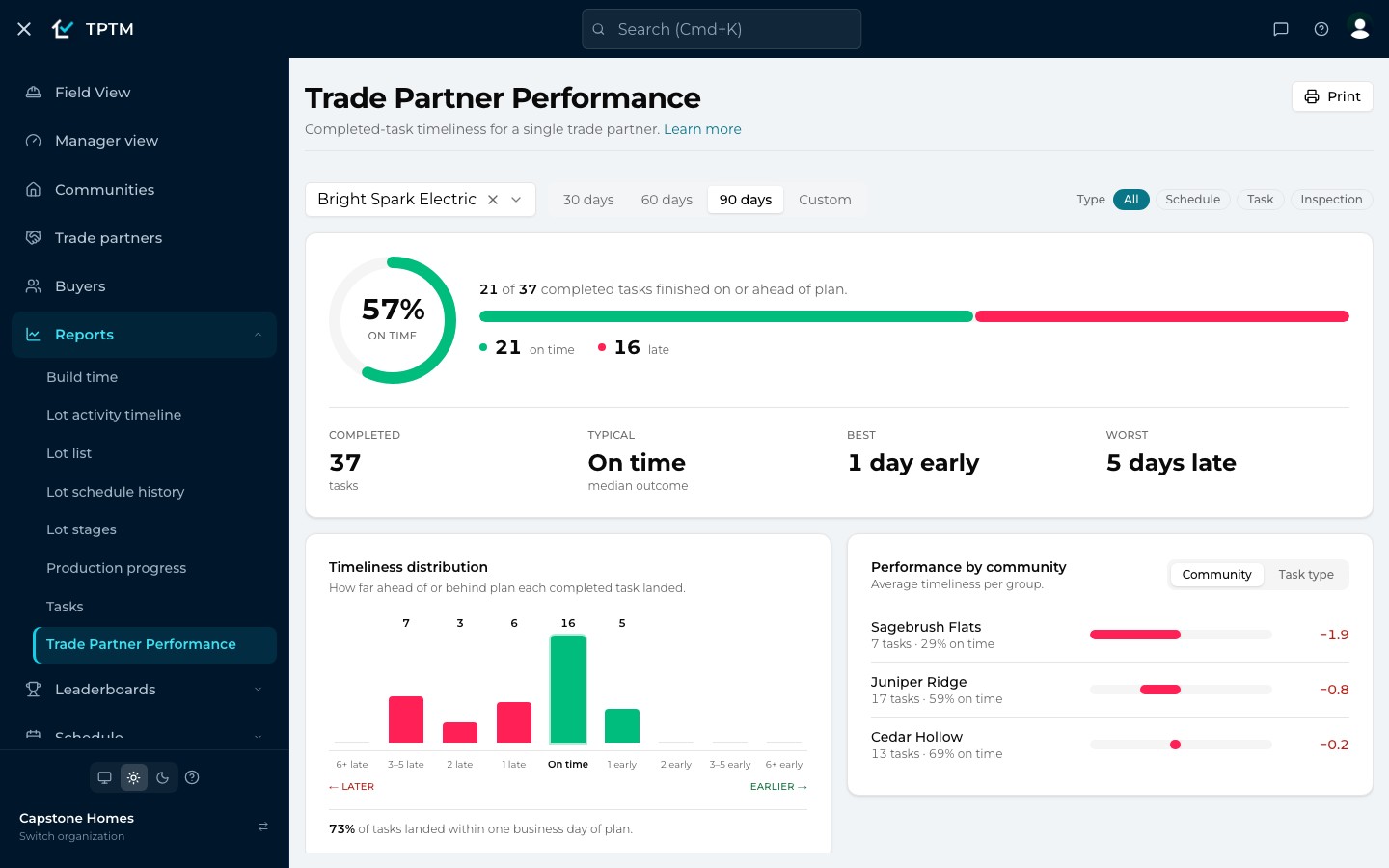
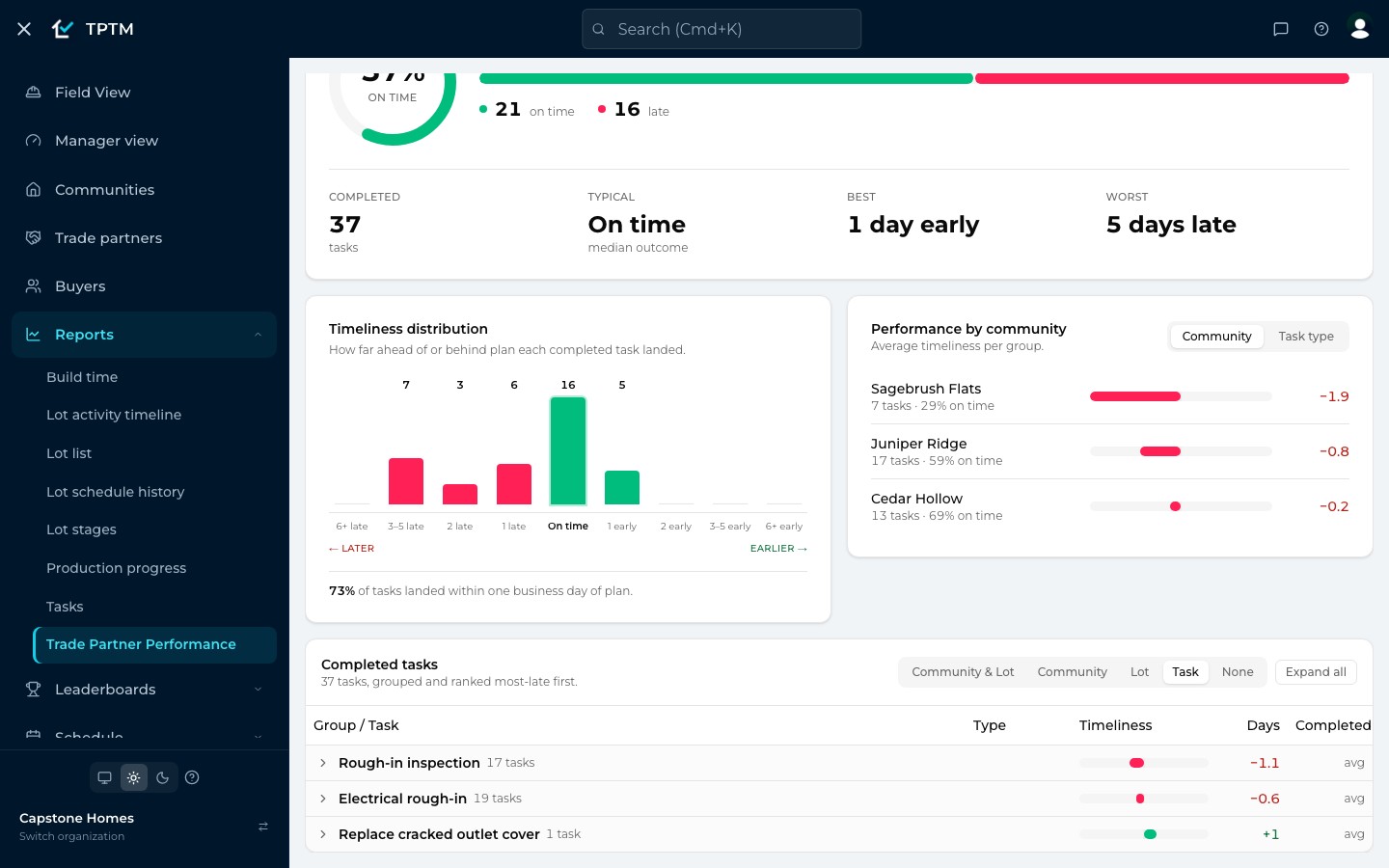
Pick a partner and a window — the last 30, 60 or 90 days, or your own dates — and the Trade Partner Performance report gathers every task they finished in it. It leads with the on-time rate: the share of completed tasks that met or beat their date. There’s deliberately no letter grade to argue about.
Beside it sit the typical result (the median, so one disastrous task can’t drag the picture), the best and the worst. A distribution shows whether a partner is steady or all over the place, and a breakdown by community — worst first — shows exactly where the slips happen.
- Filter by kind of work. Schedule, Task and Inspection chips narrow every number on the page at once.
- Links that land on the same view. The partner, window and filters live in the page address, so a bookmark or a shared link opens exactly what you saw.
Scored fairly
A score your trades can’t argue with — or game.
A scorecard only changes behaviour if the people on it believe it. So TPTM measures schedule work against the plan that was captured when the task was created — not against a due date that has since been dragged around.
That cuts both ways, on purpose. Stretching a task’s “Days to complete” after the fact can’t buy anyone a better score. A trade who was blocked because the job before them ran long is judged from when they could actually start. And if a schedule left a wider window than the job needed, that slack belongs to the trade: finishing anywhere inside it counts as on time.
- Regular tasks and inspections. These are simply measured against their due date — a standalone task’s date is its own commitment.
- Early is a win. Beating the plan shows up as days early, right alongside every other result.
Shared with the trade
The same scorecard, in the trade’s own portal.
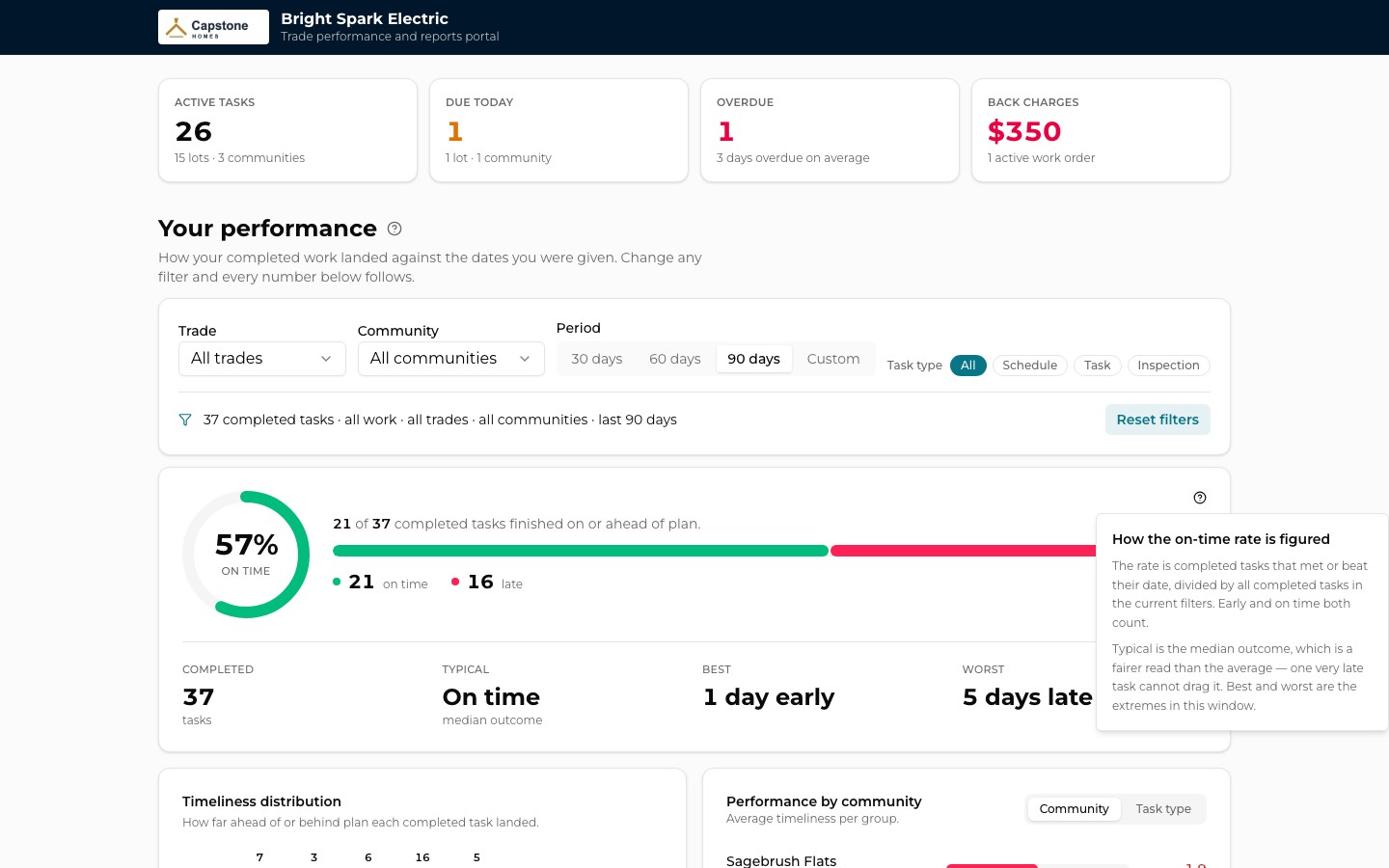
Here’s the part that changes the conversation. Every trade partner has their own portal with you — a link, no login, nothing to install — and it shows them the same on-time scoring your team reviews, built from their completed tasks on the homes you’re building.
They can narrow it to one of their trades, one community, a period, or a type of work, and every number follows. Above it sits a snapshot of where they stand right now: active tasks, what’s due today, what’s overdue and any active back charges. When a trade has open work, TPTM’s daily report email carries the link, so the numbers are never more than a tap away.
- No surprises at review time. A trade can see a community slipping the same day you can — and move a crew before anyone has to call.
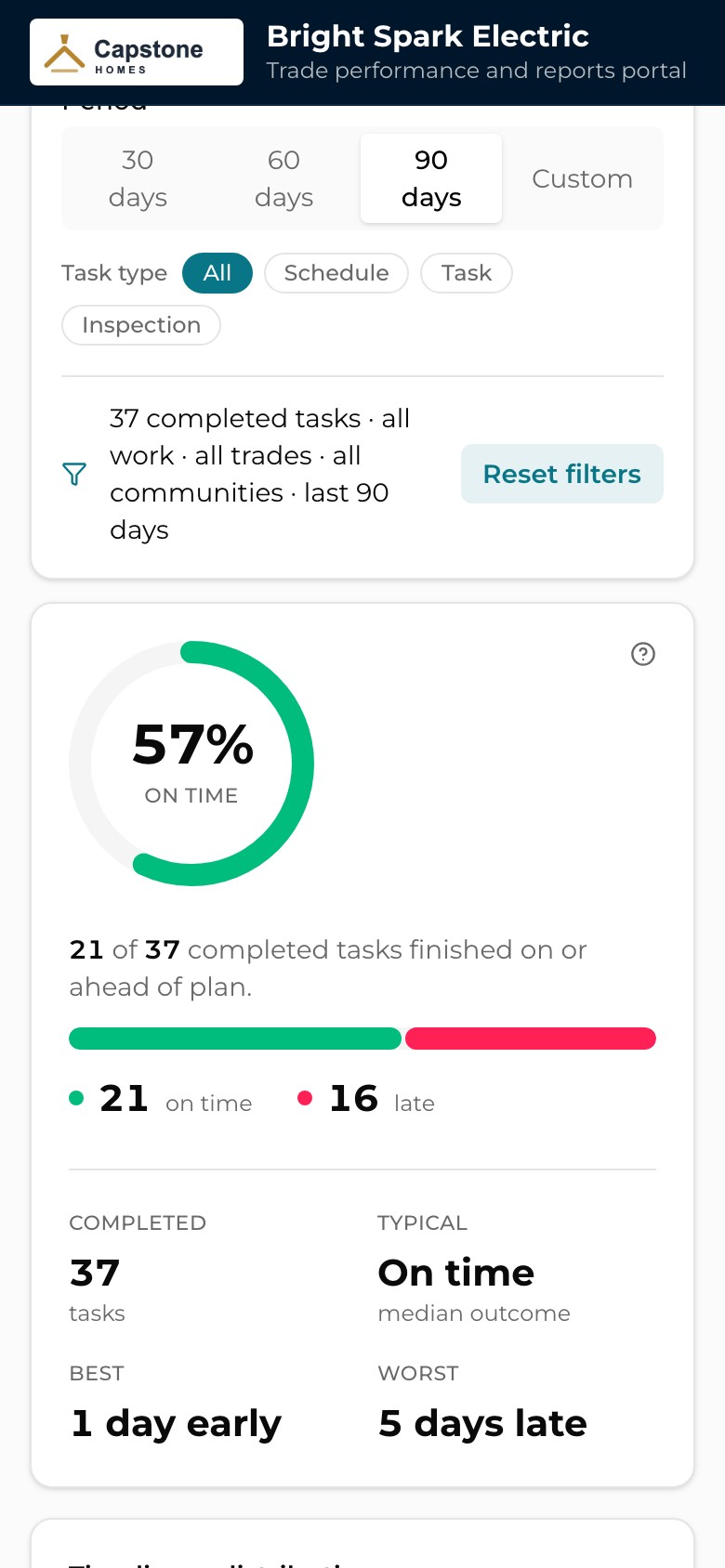
- Built for a phone. The portal reads cleanly on a phone in a truck, and the link never changes, so it’s worth a bookmark.
The review
Walk into the partner review with every task behind you.
When it’s time to sit down with a trade — or with purchasing before a contract renews — the report’s detail table has every completed task, one per row, with how early or late it landed. Group it by community and lot, by community, by lot, or by task, and each group shows its average.
Grouping by task lines up every instance of the same kind of work, so you can see how a partner does on rough-in inspections versus rough-in itself. Print it, or save it as a PDF from your browser: the printout expands every group and stamps the partner and date range at the top.
- Read-only, end to end. Nobody can change a result from the report — it’s for reviewing completed work, not editing it.
- Always live. There’s no overnight refresh; the report reads your task data every time it opens.
Across every trade
See the whole bench side by side.
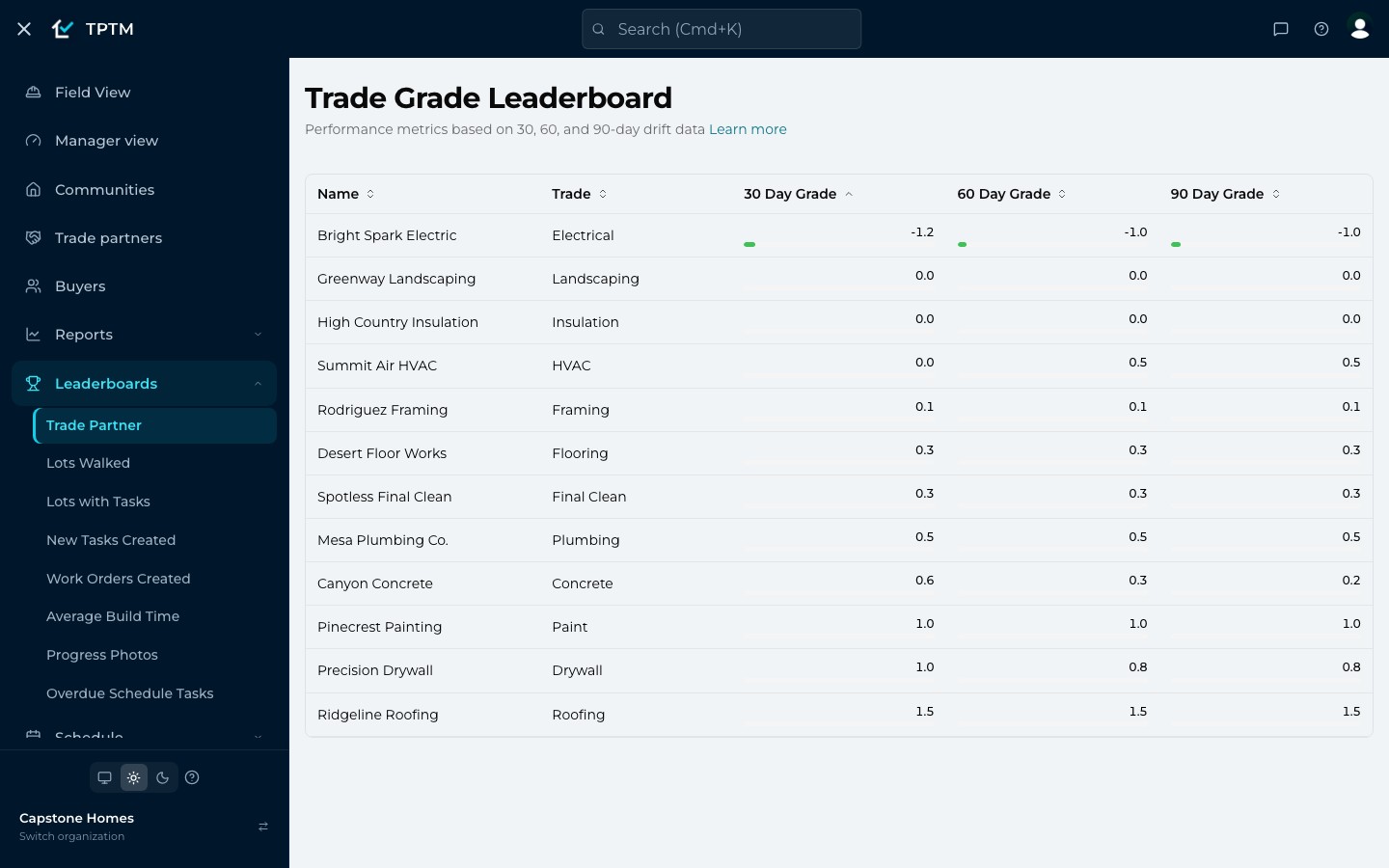
For the view across all your partners at once, the Trade Grade Leaderboard ranks them on their average working days early or late over rolling 30-, 60- and 90-day windows. Sort by any column; the 30-day grade reacts fastest, so it’s the one to watch after you’ve changed something.
Colour bars show at a glance who is comfortably on schedule and who is drifting, and a warning mark appears once a partner averages 20 working days late. Click any row to drill in.
Questions
What builders ask about this.
Do my trade partners need an account to see their numbers?
No. Each trade partner has their own portal link — no login, nothing to install. Anyone with the link can open it, so it should be shared with the people on their team who should see it. You can open it yourself from the trade partner’s page with View Portal.
How is “on time” worked out?
Each completed task is scored in working days, skipping weekends and your holidays. Regular tasks and inspections are measured against their due date. Schedule tasks are measured against the plan captured when the task was created, and any extra room in that planned window belongs to the trade — finishing inside it counts as on time. On-time and early both count toward the on-time rate.
Can a Construction Manager make a trade look better by moving dates?
Not in the performance report or the trade’s portal, for schedule work. Once a schedule task’s plan is captured it’s frozen, so stretching its “Days to complete” or dragging its due date afterwards doesn’t change its score there. For a regular task or an inspection, the due date is the commitment, so changing it does change what the task is measured against. The Trade Grade Leaderboard is a simpler at-a-glance view: it averages each task’s working days early or late against its due date.
Do trades see the same numbers we do?
They see the same scoring. The portal applies the same on-time rules as the in-app report to the same completed tasks, so on the homes you’re building, the number a trade sees is the number your team reviews. Homes you’ve archived drop out of the portal but stay in your report’s history. The portal shows the totals, distribution and breakdown; the task-by-task table stays in your report.
Is there a letter grade?
No — deliberately. The report leads with an on-time percentage and the detail behind it, because a percentage and a list of tasks give a trade something specific to fix. The Trade Grade Leaderboard shows each partner’s average days early or late as a number.
Can I share the report outside TPTM?
Yes. Print it, or choose “Save as PDF” in your browser’s print dialog — the printout expands every group and labels the partner and date range. You can also share the page’s link with anyone on your team, and it opens with the same partner, window and filters.
Get started
Give the field a program it will actually use.
Tell us about your company and we'll show you TPTM running on homes like yours.
- Tell us about your homesTwo minutes, right here.
- See it on your communitiesA walkthrough built around how your Construction Managers and trades already work.
- Send your trades a linkNo onboarding, no sign-in. They're in.
Get started with TPTM
We'll get back to you personally.